
JustAnotherGuyVerifiedModerator
Jack of all trades
Hi
I’ve followed the first steps tutorial, but no matter; “User has no backend access.”
Has it been updated recently?
Hi
I’ve followed the first steps tutorial, but no matter; “User has no backend access.”
Has it been updated recently?
Hi, in order to log into the Backend User Interface, the new user must have the isAdmin flag set to true, does that help?
Thank you Christian.
1) Ok, so the user should not be verified by the normal login procedure?
2) When I’m logged in by admin, I click on the like on the page at it takes me to; http://ip:port/projects. That works. If I open a private tab in the browser and paste the same link in, I get;
HTTP ERROR 404 Not Found
URI: http://ip:port/structr/html/projects
STATUS: 404
MESSAGE: Not Found
How am I supposed to test it? The tutorial just end without verifying that it works.
There is a (deliberate) difference between admin users (who can use the admin backend) and non-admin users.
Non-admin users need to log in via a login form in your frontend like this:
<form method="post" enctype="application/x-www-form-urlencoded" action="/structr/login?target=<name of the target page>">
  <input type="text" name="name">
  <input type="password" name="password">
  <button>Login</button>
</form>
After logging in, the page is still not visible because it must be made visible for authenticated users, and only after that, non-admin users can see the page.
Does that make sense?
Disregarding the fast that the first step tutorial mentions nothing about this (?) - I’ve managed to make a login page and make it visible for non-authenticated users.
At this point, without a tutorial, I’m just guessing how to wire it up to the /projects page.
Any more pointers? :-)
Did you try “Create Page” and then select “Sign-in Page”?
You can then add Event-action Mapping (tab “Events”) and wire the form or input fields.
Thank you for your answer!
Yes, I’ve made a couple of login pages to test the functionality. One by manually inserting a form like Christian wrote and another by modifying the sign in template to include a form. Since the template does not contain a form per default, I guess it does not need it and I can wire the code up some other way than using a form?
Also, is there a more comprehensive example somewhere? I find the docs very light on examples so it would be very helpful to see how to achieve the most common and basic functionality. For example, to use the logout functionality, how would I go about changing the logout text in the header under the profile to actually post to the backend rest endpoint? Is the procedure to add some element at that location and wire it up to some submit function? Where do I read about this? Where can I see examples?
I can do all these things manually ofc (either posts, vanilla javascript or using something else), but my interest is to see how it would be done the structr way.
Hey,
“the Structr way” would be to create button and use the “Events” tab to assigne the “Sign out” action to the “click” event like so:
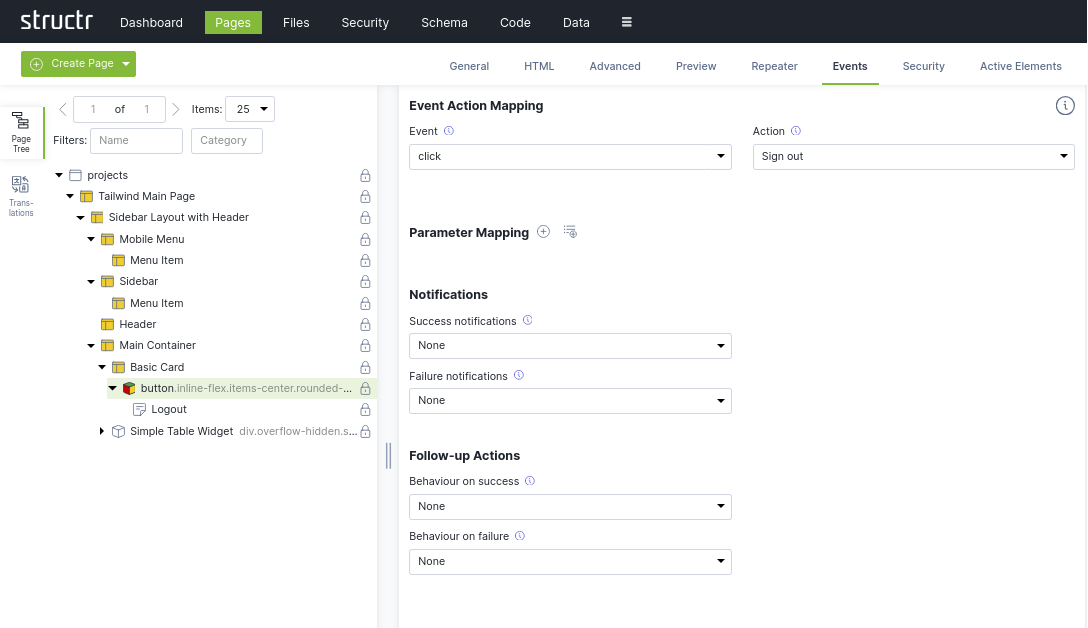
There is a lot that can be done with the Event Action Mapping, and we’re in the process of documenting this, so stay tuned. :)
And please note that this will not work out of the box with newly created empty pages because it needs the frontend.js script include.
Great to hear more documentation is coming, it’s needed for sure.
So the way forward, is to add HTML element(s) to something like a layout or page template and then one element up, render it’s children to add them to the html output and make them manageable for Structr to allow events etc.? The login and logout works now, using that workflow.
Can they be nested? Would I need more render(children) for each nested segment?
Also, I’m very unsure about the “language” described in the Code part of the docs. What can I actually do with the built in code (javascript / structr-script)? Again, the docs are very light. I’m used to java coding against neo4j, so naturally I’m also very interested in the described Integration Methods - but if I should make a project with Structr, I would naturally like to minimize out-of-Structr code and focus on utilizing Structr for as large part as possible.
Also, if anyone have a larger implementation or example with constructing something usable (for example the good old todo-app) that they can share with me, I would be very grateful.
Thanks for your work!
Yes, what you describe is the way to implement active elements in a larger template block.
You can also use individual HTML elements and nest them, they will render their children automatically and you can add actions to those elements as well.
The scripting language of choice for business logic is JavaScript, the other “language” called StructrScript is intended to be used in HTML attributes etc.
You can import a more complex application using the deployment import functionality like so:
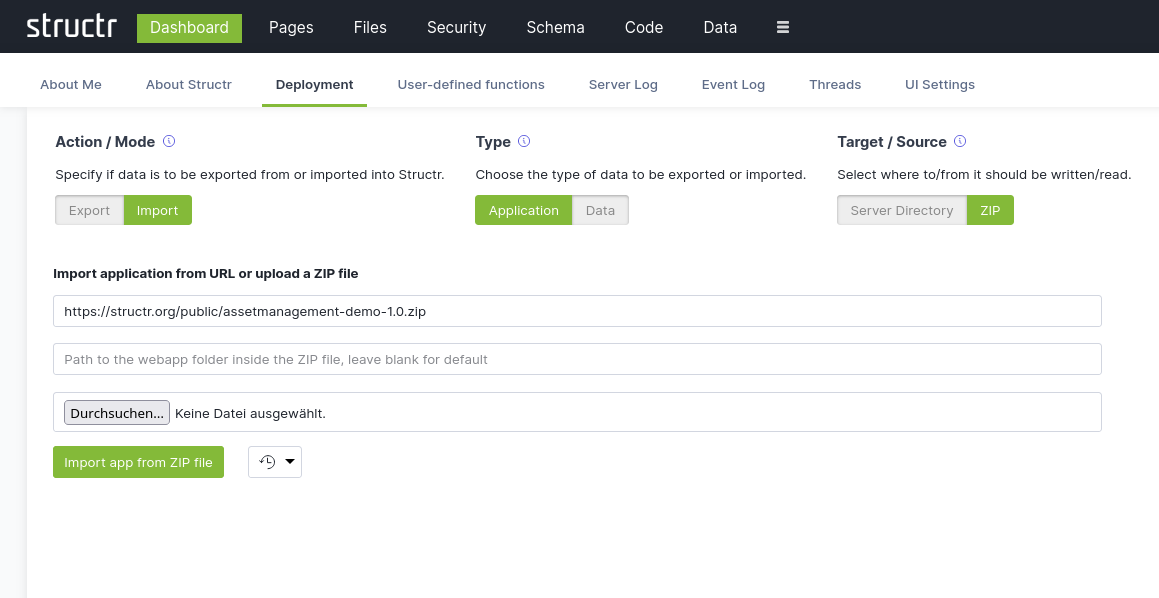
This is the path to the ZIP file that you can import directly from the remote URL: https://structr.org/public/assetmanagement-demo-1.0.zip
Be careful, the import process will remove everything that you created so far, so make sure you export it to a local folder first!
Thank you for continuing to answer my questions.
I’ve imported the app and it’s very educational.
I’ve run into more unexplained stuff in the docs;
https://docs.structr.org/docs?topic=2-Frontend#import-bootstrap-page-template
“This section is about how to use an existing web page as a template. As a source of examples, we use the Start Bootstrap Templates collection. Since we want to replace the overview page, we choose the Heroic Features page…”
Start Bootstrap Templates? Where are they?
Heroic Features page?
I hope my questions also brings value to you, having noob eyes on your docs :-)
I’m trying to wrap my head around how to make a page structure (like with a sidebar/header etc) - and changing stuff in them and the Main Container as a progress through my app and click links / open pages etc.
Also; since the AssetManagement app was possible to import, I’m wondering if there are more? I can’t browse the files inside /public so I can’t see for my self.
Yes, your questions and your perspective is very valuable for us! It helps us directly to improve our documentation and examples, so please keep the questions coming! :)
There was a time before Tailwind where everyone created web designs based on the Bootstrap template over at https://getbootstrap.com.
Structr is able to import Pages (including static assets like CSS and Javascript etc.) from a public website, and the example you find refers to that capability.
You can try it yourself, just click “Import Page” instead of “Create Page” in the Pages area, and paste this URL into the “fetch page from URL” input field:
https://getbootstrap.com/docs/5.3/examples/album/
If you click import, Structr will import the page and all the assets for you to use in your application.
Regarding additional examples: I’m currently looking for examples to share and will come back to you when I have something.
Thank you, I tried it - works great.
Let me know if I should keep any questions here, or if I should follow some other procedure. It seems the google group is not active and I don’t want to spam your forum with posts, but let me know :-)
As far as I can see in the docs, there is no example on how to connect a schema type to the built in types like User.
I would like my own Profile type to have a 1:1 relationship with a User, so as to expand it with my own data. I see User data itself, but in the schema editor I can’t seem to find the switch to show built in types - maybe it’s not there? Or maybe I’m blind :-D
How would you suggest I proceed? It would also be nice to get an idea on how to auto-create my Profile node when the user self-registers in my app.
Thanks in advance!
Turns out I was blind :-)
For anyone else looking, it’s in Schema –> Display –> Type visibility.
I would still like your suggestions though :-)
It would be great if you could continue to ask your questions here in the forum. The Google group has not been active for quite some time.
Regarding the user type: it is usually sufficient to simply add attributes to the user type and use it for all users.
There is a documentation article at https://structr.org/docs?topic=6-Authentication#user-registration on how to allow users to register themselves. You need to configure a form with the correct target URL and create the email templates for registration and password reset. This also requires access to an SMTP server that can send emails for you.
However, since this is theoretically no longer the same question, it would be great if you could create a new thread in the forum if you have further questions about self-registration, etc. :)
Thank you very much!
Sign in to reply or like posts.
Sign in